

DonutHole at a Glance
- Pass mouse and keyboard input through translucent pixels. Let users interact with applications behind your Java window on macOS.
- Build a screen recorder with a single Java window. Let users click and type through your recording controls. Avoid keeping four separate windows in sync as they move and stack on the Mac desktop.
- No flicker or flash. Your Java window looks as intended while mouse and keyboard input pass through its translucent pixels.
- Add one JAR and make a simple initialization call. Enable click through on translucent pixels in your Java application on macOS.
- Supports Java windows with or without a title bar. Use DonutHole with JFrame, JDialog, JWindow, and java.awt.Window.
- Control input pass through globally or per window. Turn it on or off from your Java code.
- Choose the opacity threshold. Set the threshold from 0 to 255 to control which pixels pass input through while keeping smooth edges.
- Distribute the JAR with any number of your products. One developer subscription covers free and commercial apps with no additional fees or royalties.
- Keep your developer subscription active. DonutHole checks a license server and stops working in your apps if your subscription becomes inactive.
- One month free trial. No credit card required. Your email address is needed to issue your license.
- Cancel anytime through your account. No need to contact us.
- Coming soon for Java developers on macOS. Sign up to be notified when DonutHole is available.
Overview
Add this JAR to your Java Desktop project to have macOS mouse and keyboard events pass through your application’s translucent pixels to the applications behind it.
A TRANSPARENT pixel is a pixel that is COMPLETELY see through (Opacity = 0.). A TRANSLUCENT pixel is one that is PARTIALLY see through. “DonutHole” sees through TRANSLUCENT pixels. That means YOU get to decide what opacity level (255 down to 0) allows seeing through. This allows partially transparent pixels near your completely transparent pixels, making smooth visible edges.
The JAR uses default settings to work immediately. But, it allows interaction with the DonutHole Java Class to turn seeing through on or off, or to change the opacity see through level. Supports:
- Translucent pixel threshold level
- On/off
- Set globally or per window
- Supports Java windows with or without a title bar. Use DonutHole with JFrame, JDialog, JWindow, and java.awt.Window.
The Broken Transparent Click Through Java Problem
macOS Java Desktop Developers with an app that interacts with apps behind it, discover that Java doesn’t support this. A mouse click or keyboard event on a transparent or translucent pixel will not be passed through to the application behind it. It is frustrating and a huge technical hurdle.
Java Developers have to use alternative approaches to get around this broken Java feature. For example, imagine that a Java Developer creates an application that records the user’s desktop screen and allows the user to manipulate the applications through a translucent rectangle in the application’s control panel. The user should be able to interact with the application behind it with the mouse and keyboard, but the Java application won’t work.
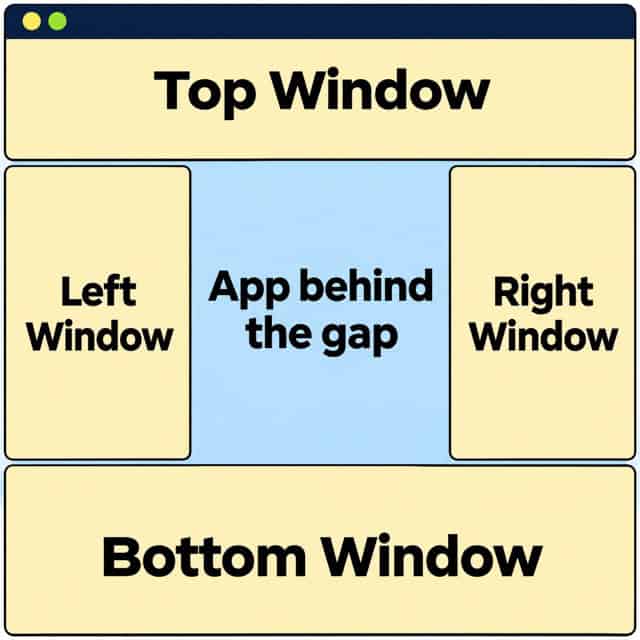
One workaround uses four separate Java windows to mimic a single window with a rectangular opening. Dragging the title bar means moving all four windows together. If one window repositions late, the pieces can visibly fall out of alignment. If macOS changes their stacking order, another app’s window can slip between the pieces.
Keeping the four windows aligned and stacked together takes extra code and can still leave bugs your customers see. With DonutHole, you use one Java window with a translucent cutout. It moves and stacks as one window, and users can click and type into the app behind it.
You Want to Click Through Transparent Pixels
One Java window with a translucent opening that lets mouse and keyboard input reach the app behind it. In this example, you can click through the transparent area of a Java screen recorder on macOS and type in the Notes window behind it while recording.

What you HAVE to do without DonutHole
Four separate Java windows mimic one window with a cutout. Only the top has a title bar. The other three must follow when it moves, and all four must stay together in the desktop stacking order.
Licensing
See End User License Agreement.
DonutHole is licensed to you, a Java Developer, on a subscription basis, allowing unrestricted use in your own applications. You may integrate the DonutHole JAR into any number of products that you develop and distribute, whether commercial or free, without incurring additional licensing fees or royalties. Just a small monthly fee.
DonutHole checks a license server. If your subscription becomes inactive, the DonutHole feature in your application will stop working.
Articles
Foojay.io
NEBULA SOFTWARE’S UNIQUE USER INTERFACE
Coming December 1st!
“In the NebulaSoftwareLookAndFeel, the baggage and overhead of BasicLookAndFeel were dropped and only what was needed and desired was added. The UI therefore ended up being extremely fast and highly responsive.”
JAVAPRO International
NEBULA SOFTWARE’S UNIQUE USER INTERFACE
Coming soon!
Read JAVAPRO International’s Article
“The complete UI appears less than two seconds after you double-click the application icon.”


Boyd Edmondson –
I think you are going to love this product!