

DisplaySwitcher
Switch your monitor’s video input and seamlessly transfer text and files! A Linux/macOS/Windows Desktop Application.
The Problem
Monitors, Operating Systems (OSes), ports (HDMI, DisplayPort), cables all must comply to the standard for monitor switching but they often do not and just fail to work, or your Monitor manufacturer doesn’t support software for your OS.
For example, I have a Dell monitor that lets me KVM switch from Windows to macOS, but not back again, because Dell doesn’t offer software for macOS.
Now you have to fiddle with the physical buttons under your monitor to switch its input.
That’s where Nebula Software’s DisplaySwitcher comes in!
The Solution
Just click a software button! No more fiddling with the physical buttons under your monitor!
DisplaySwitcher runs on Linux, macOS, and Windows, and works with any monitor that supports the DDC/CI (Display Data Channel / Command Interface) standard (most modern monitors do).
This lets DisplaySwitcher send a “switch video input” command from your computer to the monitor through its cable. The monitor switches its video source, and if it’s KVM-enabled, your keyboard and mouse move with it.
Bonus Features
Because DisplaySwitcher runs on all your computers, you can also use it to transfer text and files between your computers with cut-and-paste, drag-and-drop, or file browsing.
Because DisplaySwitcher runs on all your computers, you can have a computer that doesn’t support monitor switching ask one that does to switch your monitor instead!
Your text and files are protected by encrypted connections and transferred only between computers signed in to your account.
Automatically selects an available DisplaySwitcher server based on response time and capacity, so your transfers are as fast as possible.
Risk Free
Try DisplaySwitcher for one month free. No credit card required for the free trial.
If it doesn’t work for you for any reason, then just cancel your subscription through your account page. No need to contact us.
Licensing
See End User License Agreement.
Examples
Video Advertisement of Concepts
Video of Actual Product doing Computer Transfer and Monitor Switch
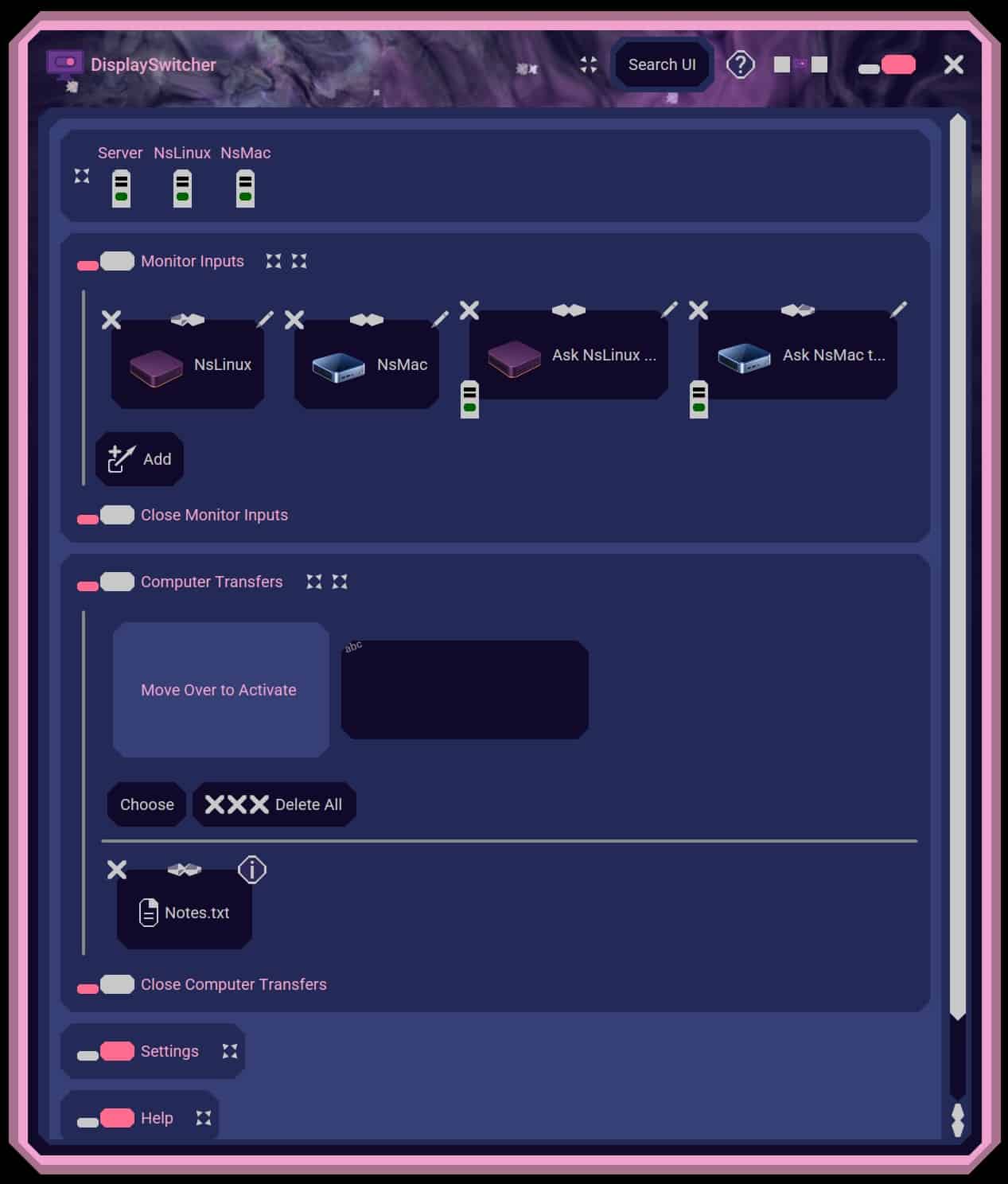
Click for full size screenshot of DisplaySwitcher application.
Reviews
LaunchBuff.com
https://launchbuff.com/reviews/displayswitcher-gxsn2x
“At $2.95 per month, the cost covers a daily physical interruption for roughly the price of a coffee monthly. For someone switching monitor inputs five or ten times a day, the savings in reach-and-wait time make the value case in the first week. The one-month free trial lets you verify DDC/CI compatibility with your specific monitor and cable before committing.”
LaunchScaler.com
ACTUAL PRODUCT USAGE REVIEW
Coming soon!
“future quote”
PostYourStartup.co
ACTUAL PRODUCT USAGE REVIEW
Coming soon!
“future quote”
Uneed.Best
ACTUAL PRODUCT USAGE REVIEW
https://1335.uneed.best/blog/displayswitcher-review
“The transfers are the real draw: you install the app on two computers, and from then on anything you paste or drop on one shows up on the other within a second, without touching your network settings.”
Articles
Foojay.io
NEBULA SOFTWARE’S UNIQUE USER INTERFACE
Coming December 1st!
https://foojay.io/today/author/boyd-edmondson/
“In the NebulaSoftwareLookAndFeel, the baggage and overhead of BasicLookAndFeel were dropped and only what was needed and desired was added. The UI therefore ended up being extremely fast and highly responsive.”

Boyd Edmondson –
I think you are going to love this product!